Pages
- Home /
- Pages
Festive Discount 2025
Celebrate the Season with PortDroid Pro: 10% Off!
This festive season, unwrap the gift of advanced network analysis with PortDroid Pro at a special 10% discount! Embrace the holiday spirit by using the promo code XMAS2025 and unlock a lifetime of premium features. Don’t miss this opportunity to elevate your tech experience with PortDroid Pro – your go-to tool for top-tier network analysis.
How to use
- Get the App: Download PortDroid from the Google Play Store
- Access the Menu: Tap the menu button in the top-left corner
- Go Pro: Select ‘Unlock Pro Features’ and then ‘See Pricing’
- Apply Code: Choose ‘Promo Code’, enter XMAS2025, and tap ‘Add’
- Seal the Deal: Select the ‘Promotional Lifetime Price’ to complete your purchase
- Enjoy: Delve into the full PortDroid experience at an unbeatable price! 😊
Spread the Love
Thrilled with PortDroid Pro? Spread the word by leaving a review on Google Play — it means the world to me! If you stumble upon any issues or have ideas to share, reach out directly. Your input makes PortDroid better for everyone. Cheers to your network adventures! 🍻
Read MoreBlack Friday 2025
50% off for Black Friday and Cyber Monday
For this Black Friday and Cyber Monday, dive into network analysis with PortDroid Pro at half the price! Use the promo code CYBER_2025 and unlock a lifetime of features.
How to use
- Get the App: Download PortDroid from the Google Play Store
- Access the Menu: Tap the menu button in the top-left corner
- Go Pro: Select ‘Unlock Pro Features’ and then ‘See Pricing’
- Apply Code: Choose ‘Promo Code’, enter CYBER_2025, and tap ‘Add’
- Seal the Deal: Select the ‘Promotional Lifetime Price’ to complete your purchase
- Enjoy: Delve into the full PortDroid experience at an unbeatable price! 😊
Spread the Love
Thrilled with PortDroid Pro? Spread the word by leaving a review on Google Play — it means the world to me! If you stumble upon any issues or have ideas to share, reach out directly. Your input makes PortDroid better for everyone. Cheers to your network adventures! 🍻
Read MorePromo
Congratulations you found a promotional code!
Well done! You have won, found or hacked the gibson to obtain a promotional code that will unlock a free copy of PortDroid Pro for you.
How to use
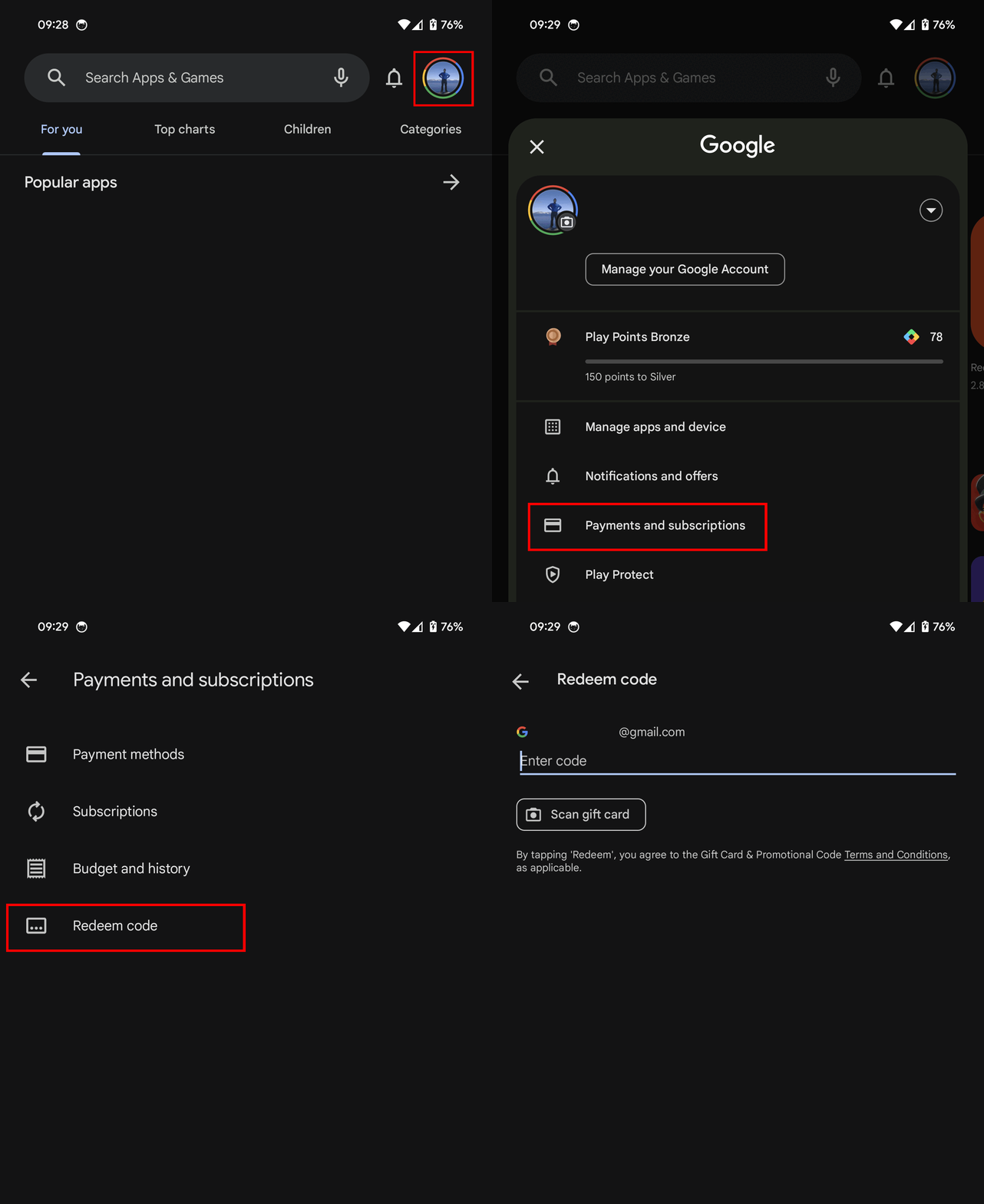
- Open Google Play on your Android device
- Tap on your profile picture
- Tap on payments and subscriptions
- Tap on redeem code
- Enter the code you have found and click redeem
- Enjoy your free copy! Easy 😊
More details on this Google Play help page if needed.
Read MoreFeatures
PortDroid is free to use and does not contain adverts or analytics. Additional features are unlockable via in-app purchase, this funds the development and server costs.
Port Scanner
Perform port scans on a device to identify running operating systems and applications. It can also use Banner Grabbing on with each port in order to gain more information or discover a web service. When a service is found on a port external applications will be offered to deal with certain protocols (ssh, telnet, http, https, ftp, smb etc.)
Read MoreChangelog
This changelog keeps track of the significant changes in PortDroid.
1.0.7
- Added export (CSV, JSON, plaintext) to WiFi Scanner and Certificate Viewer
- Added Spanish and Portuguese Translations
- Improved WiFi scanner UI
- Added history to WiFi Scanner
1.0.6
- Added mDNS browser
- Added UPnP browser
- Fixed continuous pinging
1.0.3
- Added Speed Test (Please give feedback!)
- Added Local DNS option (Only A/AAAA records currently)
- Removed Community Forum (not really used)
0.8.26
- Massively reworked exporting / sharing of results
- Added options to export in Plaintext, CSV or JSON formats
- Caught a few more little bugs
0.8.16
- Introducing a new tool: WiFi Analyzer — scan WiFi networks with ease!
- Device Info page given a complete refresh — stay tuned for more enhancements!
- Pull-to-refresh now available in Local Network, Device Info, and Ping.
- Never miss an update — get prompted for the latest version installations.
- New option to opt out of crash reporting.
- Better user experience: enhanced visibility for progress bar.
- Special thanks to Zen: fixed a bug in DNS lookup not working for RFC8482 compliant hosts.
0.8.10
- Port Scanner & Multi-IP Port scanner have added informational chips showing SSH software versions, OS and HTTP server details when available.
- Ping Graph got some much needed UI love.
- DNS Lookup now returns more record types and is much more reliable.
- Added principle and alternative names to Certificate Viewer allowing you to identify domains for a given host.
0.8.06
- Ping has a significantly improved UI
- IPv6 support in most tools
- Added more pricing options for purchasing PortDroid Pro
- Port Scanner now shows server header information if present for HTTP/HTTPS servers in a chip
- Better explanations for all tools in the app
- Heaps more crash fixes, tweaks and improvements!
0.7.16
- Fixed a bug so now the subnet size is correctly scanned in the local network scanner instead of limiting it to the first 256 hosts. Bigger networks can now be scanned!
- Traceroute rewritten for improved stability and resilience.
- Flags added to traceroute 🏳️🌈
0.7.04
- Added Certificate Viewer to inspect TLS certs
- Fixed and improved Traceroute
- Fixed ping graph crashes
- Opening applications from port scanner improved (i.e. HTTP/HTTPS)
- More context menu links from all screens into other tools
- New shodan.io context menu integration
- Lots of other bug fixes and quality of life improvements
0.6.22
- Local network scanner now looks up the netmask to figure out the range to scan rather than hardcoding to /24 (256 hosts).
- Added CIDR support to Multi-IP Port Scanner
0.6.17
- Fixed a few crashes
- Fixed all ports showing as ‘unknown’ during scan
- Fixed traceroute dropping everything in the middle of ocean (0,0)
- Updated open source libraries used to redirect to webpage
0.6.15
- Added IP calculator
- Added settings links to device info
- Lots of optimizations and bug fixes
- Added refresh button to device info
- Added call option to whois results
- Reduced app size to ~2mb from ~5mb
0.6.02
This was a major update that consisted of mainly upkeep and optimization to modernize the code. This should result in much faster future development time :)
Read MorePermissions
What permissions are needed and why?
PortDroid only requires a few basic permissions in order to operate, these are explained below. There are also a few optional permissions that will provide additional functionality. Note that PortDroid does not and will never store or share any personal information.
Optional Permissions
The following permissions are completely so can be safely denied if you do not want the additional functionality they offer.
- Make and manager phone calls (READ_PHONE_STATE) - This is used to get additional information about the mobile network state and mobile network provide.
- Location (ACCESS_FINE_LOCATION) - This is used to get the current WiFi network name.
Required Permissions
- Internet (INTERNET) - Internet access is needed in order to perform any of the network requests that make PortDroid a useful application.
- WiFi Connection Information (ACCESS_WIFI_STATE, ACCESS_NETWORK_STATE) - This permission is used to gain more information about the network and WiFi network states.
Privacy
Privacy Policy
Stealthcopter built the PortDroid app as a Freemium app. This SERVICE is provided by Stealthcopter at no cost and is intended for use as is.
This page is used to inform visitors regarding our policies with the collection, use, and disclosure of Personal Information if anyone decided to use our Service.
If you choose to use our Service, then you agree to the collection and use of information in relation to this policy. The Personal Information that we collect is used for providing and improving the Service. We will not use or share your information with anyone except as described in this Privacy Policy.
Read MoreTerms & Conditions
Terms & Conditions
By downloading or using the app, these terms will automatically apply to you – you should make sure therefore that you read them carefully before using the app. You’re not allowed to copy or modify the app, any part of the app, or our trademarks in any way. You’re not allowed to attempt to extract the source code of the app, and you also shouldn’t try to translate the app into other languages or make derivative versions. The app itself, and all the trademarks, copyright, database rights, and other intellectual property rights related to it, still belong to Stealthcopter.
Read More